
Showing posts with label Philippines. Show all posts
Showing posts with label Philippines. Show all posts
Monday, July 28, 2014
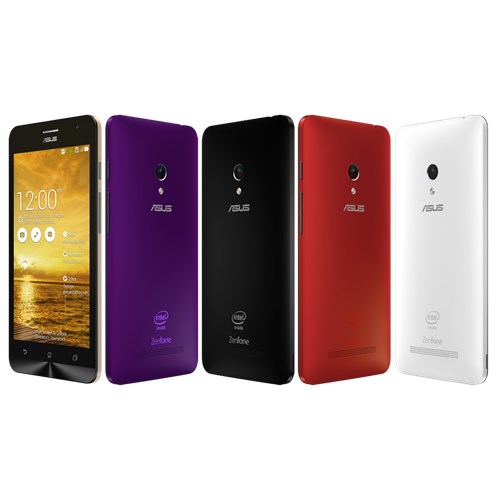
Asus Zenfone 5 Unboxing and Initial Impressions


Sunday, June 22, 2014
LG G3 Live Demo Unit Experience
Over the weekend, I finally got the chance to visit the LG Store in SM Megamall and experience their newest flagship, the LG G3.
More details after the jump
Wednesday, June 18, 2014
LG G3 pre-order goes live in the Philippines

Image courtesy of LG Philippines Blog
Details here: http://www.lgblog.com.ph/uncategorized/lg-g3-pre-order
LG Mobile Philippines is putting the LG G3 up for preorder from June 18 to June 27, 2014.
More details after the jump
More details after the jump
Wednesday, March 19, 2014
Kitkat Upgrade for LG G2 from Philippines is now available!

With the screenshot taken from my LG G2 purchased from Globe Telecom, it suggests that Kitkat upgrade is now available via LG Software Upgrade Tool. This also means that it will be availale tomorrow via OTA.
Connect your LG G2 to your PC now and and try to upgrade via Upgrade Tool and let us know if you're able to upgrade.
Saturday, September 21, 2013
BBM for Android and iOS now LIVE in the Philippines
UPDATE [9/22/2013]: Blackberry disabled the leaked BBM for Android app due to overwhelming traffic and says it caused an issue to their part. If you install the APK now and attempt to login or register, you will be redirected to the BBM webpage and there's no way to login. We'll update thei page once the offical APK becomes available in Google Play.
As most of you know, September 21 is the launch of BBM on Android worldwide, and a day after for iOS. However it turns out it's the other way around in the Philippines. iPhone users get to see and download BBM from the App store, while fake BBM apps continue to flood Google's Play Store, and the original BBM app is nowhere to be found.
As you see on the screenshot below, you can login using your existing Blackberry ID, however it will provide new a new PIN, just like when you upgrade to a newer Blackberry phone. I also need to point out that logging-in did not import my existing BBM contacts from my old Blackberry (which is weird and needs to work on to). Other than that, so far so good. It gives me the same feel of the same old BBM on the Blackberry. I am also able to invite and chat with BBM users on Android, iOS, and Blackberry platforms.
Anyway, to tease you more, here are photos of BBM on Android installed in my phone and friend's tablet. You can also add me on BBM. Enjoy the photos!


As most of you know, September 21 is the launch of BBM on Android worldwide, and a day after for iOS. However it turns out it's the other way around in the Philippines. iPhone users get to see and download BBM from the App store, while fake BBM apps continue to flood Google's Play Store, and the original BBM app is nowhere to be found.
As you see on the screenshot below, you can login using your existing Blackberry ID, however it will provide new a new PIN, just like when you upgrade to a newer Blackberry phone. I also need to point out that logging-in did not import my existing BBM contacts from my old Blackberry (which is weird and needs to work on to). Other than that, so far so good. It gives me the same feel of the same old BBM on the Blackberry. I am also able to invite and chat with BBM users on Android, iOS, and Blackberry platforms.
Anyway, to tease you more, here are photos of BBM on Android installed in my phone and friend's tablet. You can also add me on BBM. Enjoy the photos!


Can't wait for it to appear on Play store? Follow this link, download, and install the APK. Enjoy!
Follow and send me a tweet on Twitter: @JBTizon
Tuesday, July 23, 2013
Official Jellybean update now available for Optimus L5, L7, L9 and 4X in the Philippines

Courtesy of LG Philippines Blog:
The latest version in Android is now available in select models of the first-generation LG Optimus L Series smartphones! For Optimus L5, L7, and L9, users may now upgrade their current Android to Jellybean OS.
The Jellybean version adapts the functional features of earlier updates of Android such as Gingerbread, Honeycomb, and Ice Cream Sandwich, but it also includes new developments to further beef up the dynamic and consumer-centric package of smartphones.
For one, audio feedback and gesture controls are enhanced for a more sensory and accessible user experience. Smartphone screens are made more visually attractive with smoother and speedier graphic displays as well as improvements in web browser and file management. Intuitive experiences are pushed even further with smarter keyboard predictions and the Jellybean’s advanced natural language voice command. The most impressive inclusion of the Jellybean would be Google Now, which gives the user information relevant to the current situation, such as train schedules while one is on a subway platform, traffic or weather conditions while on the road, and many more.
To upgrade, customers may visit any authorized LG Mobile Service Center or download Jellybean through http://www.lg.com/ph/support. Users of Optimus L9 may also choose the built-in Firmware Over-the-Air or Software Upgrade Option.
The Jellybean update is also now available in LG’s first Quadcore device, the Optimus 4X HD.
For more information on the products of LG Mobile, visit www.lg.com/ph or www.lgblog.com.ph or like LG Mobile’s official Facebook page—LG Optimus PH.
Sunday, June 9, 2013
Smart Freedom Sale on June 12, 2013
In celebration of the Philippine Independence Day on June 12, 2013, Smart will be holding it first ever Smart Freedom Sale.

Get the 64GB iPhone 4S forP10,490 P10,900, Samsung Galaxy Tab 2 7.0 (P3100) Samsung Galaxy Tab 7.0 Plus (P6200) for only P4490 P5600, and 8GB iPhone 3GS for only P4900. Other phones are also on sale! Go get these great deals only from Smart Gateway (Gateway Activity Center) and Smart Robinsons Galleria (Robinsons Movie World area) on June 12, 2013 only from 10AM to 7PM.
The catch: You have to subscribe to SMART freedom plan, which is a zer0-plan. If you dont use it, you don't get billed. It also does not have a holding period. So bring an additional P600 for 1 month advance and valid IDs. Want to know more about Smart's Freedom Plan? Click here! http://www1.smart.com.ph/Postpaid/plans/freedom-plans

Disclaimer: Smart is NOT an advertiser of this blog and this is not a paid post.

Image from Smart's Facebook Page
Get the 64GB iPhone 4S for
The catch: You have to subscribe to SMART freedom plan, which is a zer0-plan. If you dont use it, you don't get billed. It also does not have a holding period. So bring an additional P600 for 1 month advance and valid IDs. Want to know more about Smart's Freedom Plan? Click here! http://www1.smart.com.ph/Postpaid/plans/freedom-plans

For complete list of phones, go to: http://www1.smart.com.ph/Postpaid/promos/freedom-to-follow/
Disclaimer: Smart is NOT an advertiser of this blog and this is not a paid post.
Follow and send me a tweet on Twitter: @JBTizon
Saturday, June 8, 2013
Nokia Lumia 920 now available on Smart Data Plan 1500

Windows Phone 8 and Lumia lovers rejoice! Smart recently announced that they are now carrying the best camera smartphone yet... Nokia Lumia 920. Well, a friend of mine already availed of this phone together with a plan from Smart a week and half ago before this was announced on Smart's website.
It's free in Data Plan 1500 (30 month commitment) with unlimited LTE connectivity*, 120 texts to all networks and 60 minutes of local/domestic calls or All-In Plan 1800.
Key features
- Quad-band GSM/GPRS/EDGE support
- Quad-band 3G with 42 Mbps HSDPA and 5.7 Mbps HSUPA support
- 4.5" 16M-color PureMotionHD+ IPS display with a resolution of 1280 x 768 pixels
- 8 megapixel autofocus camera with LED flash, 1080p@30fps video recording
- Optical Image stabilization with floating lens technology
- 1.3MP front-facing camera
- Windows Phone 8 OS
- 1.5GHz dual-core Krait CPU, Adreno 225 GPU, Qualcomm MSM8960 chipset, 1GB of RAM
- Wi-Fi 802.11 a/b/g/n, dual-band
- GPS receiver with A-GPS and GLONASS support
- Free lifetime voice-guided navigation
- 32GB of inbuilt storage
- Active noise cancellation with a dedicated mic
- Wireless charging with optional accessories
- Built-in accelerometer, gyroscope and proximity sensor
- Standard 3.5 mm audio jack
- microUSB port
- Bluetooth v3.0 with A2DP and EDR, file transfers
- SNS integration
- Xbox Live integration and Xbox management
- NFC support
- Digital compass
- Nokia Music
Main disadvantages
- App catalog falls short of Android and iOS
- No microSD card
- No FM radio
- No system-wide file manager
- No lockscreen shortcuts
- Size and weight something to definitely consider before you buy
- Audio output not worthy of a flagship
- Non user-replaceable battery
Reference: http://www1.smart.com.ph/About/newsroom/all-press-releases/2013/06/07/get-the-best-lte-smartphone-experience-only-from-smart
Follow and send me a tweet on Twitter: @JBTizon,
Thursday, January 17, 2013
Samsung Galaxy S III 4.1.2 Update is finally in the Philippines
The long wait is over! Philippines finally received the most anticipated update for Samsung Galaxy S III, Jellybean 4.1.2.

With 4.1.2 you get:
-Android 4.1.2 – JZO54K
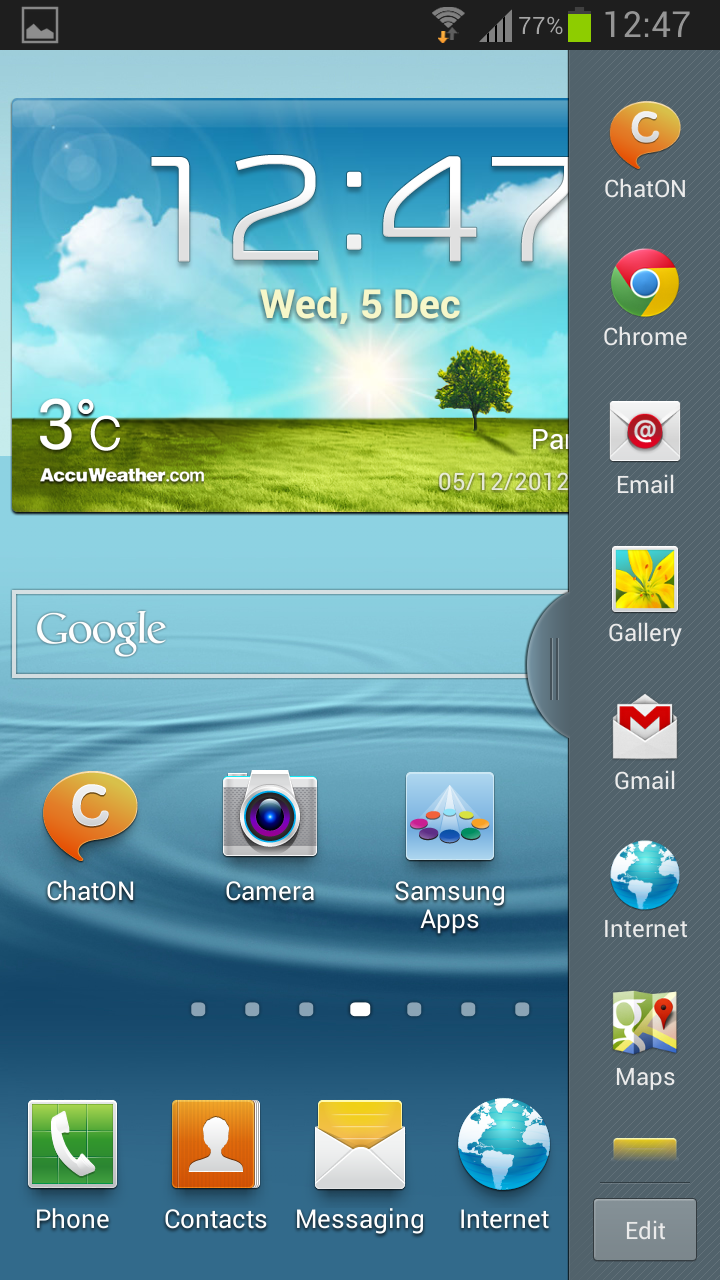
-Multi-View (Multi-Windows Multitasking, same as in Note II)
-Page Buddy
-New Gallery App (Same as in Note II)
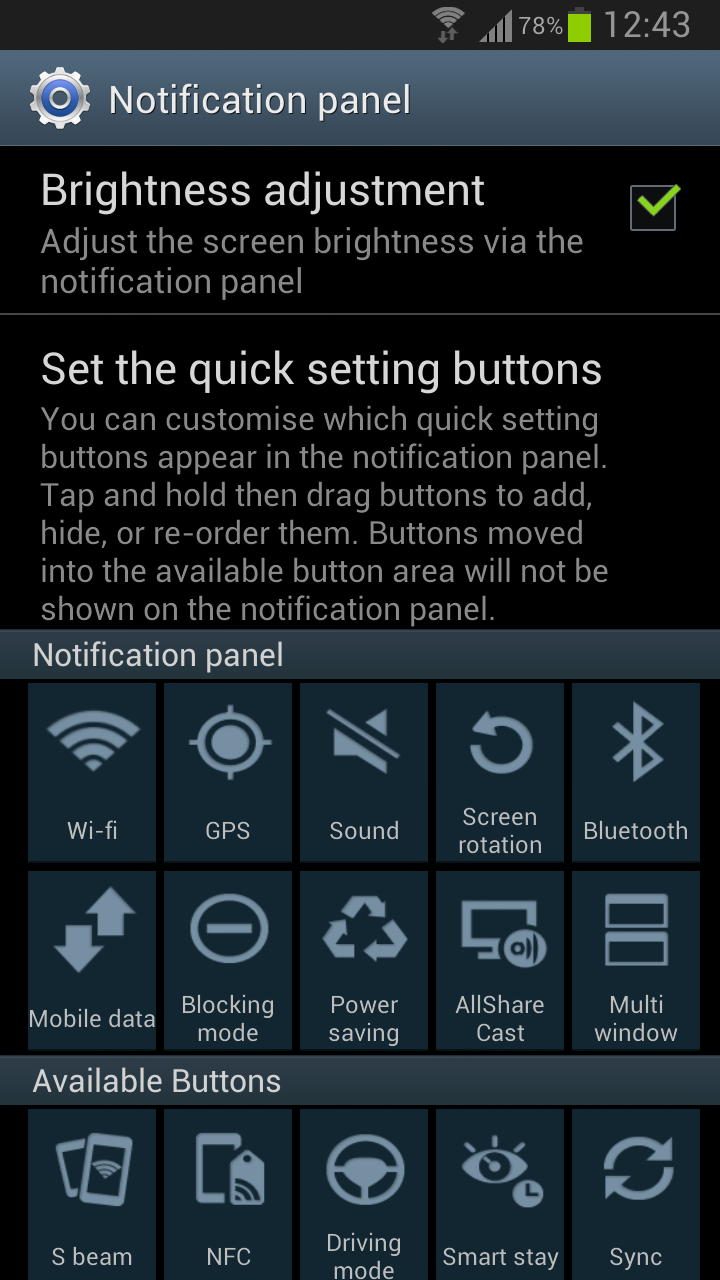
-Notification Panel (Notification Panel can now be customized)
-Brightness Slider in Notification Panel Can Now Be Disabled
-Smart Rotation (Screen Display adjusts to your angle of sightings)
-Continues Input in Samsung Keyboard (Like Swipe or Android 4.2 Keyboard)
-Paper Artist App
-Group Cast App
Now, connect that phone to your PC with hi-speed internet, and download that update. Or wait for the OTA (over-the-air) update later today.


Reference: http://www.sammobile.com/2012/12/05/galaxy-s-iii-receives-android-4-1-2-jelly-bean-update-lots-of-new-features/
With 4.1.2 you get:
-Android 4.1.2 – JZO54K
-Multi-View (Multi-Windows Multitasking, same as in Note II)
-Page Buddy
-New Gallery App (Same as in Note II)
-Notification Panel (Notification Panel can now be customized)
-Brightness Slider in Notification Panel Can Now Be Disabled
-Smart Rotation (Screen Display adjusts to your angle of sightings)
-Continues Input in Samsung Keyboard (Like Swipe or Android 4.2 Keyboard)
-Paper Artist App
-Group Cast App
Now, connect that phone to your PC with hi-speed internet, and download that update. Or wait for the OTA (over-the-air) update later today.

Reference: http://www.sammobile.com/2012/12/05/galaxy-s-iii-receives-android-4-1-2-jelly-bean-update-lots-of-new-features/
Subscribe to:
Posts (Atom)